Private Portfolio & Paper Trading Guide
Track your simulated stock holdings, record virtual buy/sell executions, audit realized and unrealized profit mathematics, and practice disciplined position sizing.
💼 6.1 Private Portfolio Screen Anatomy
The Portfolio screen acts as your offline-capable, cloud-synced trading journal. Click the screenshot below to zoom:
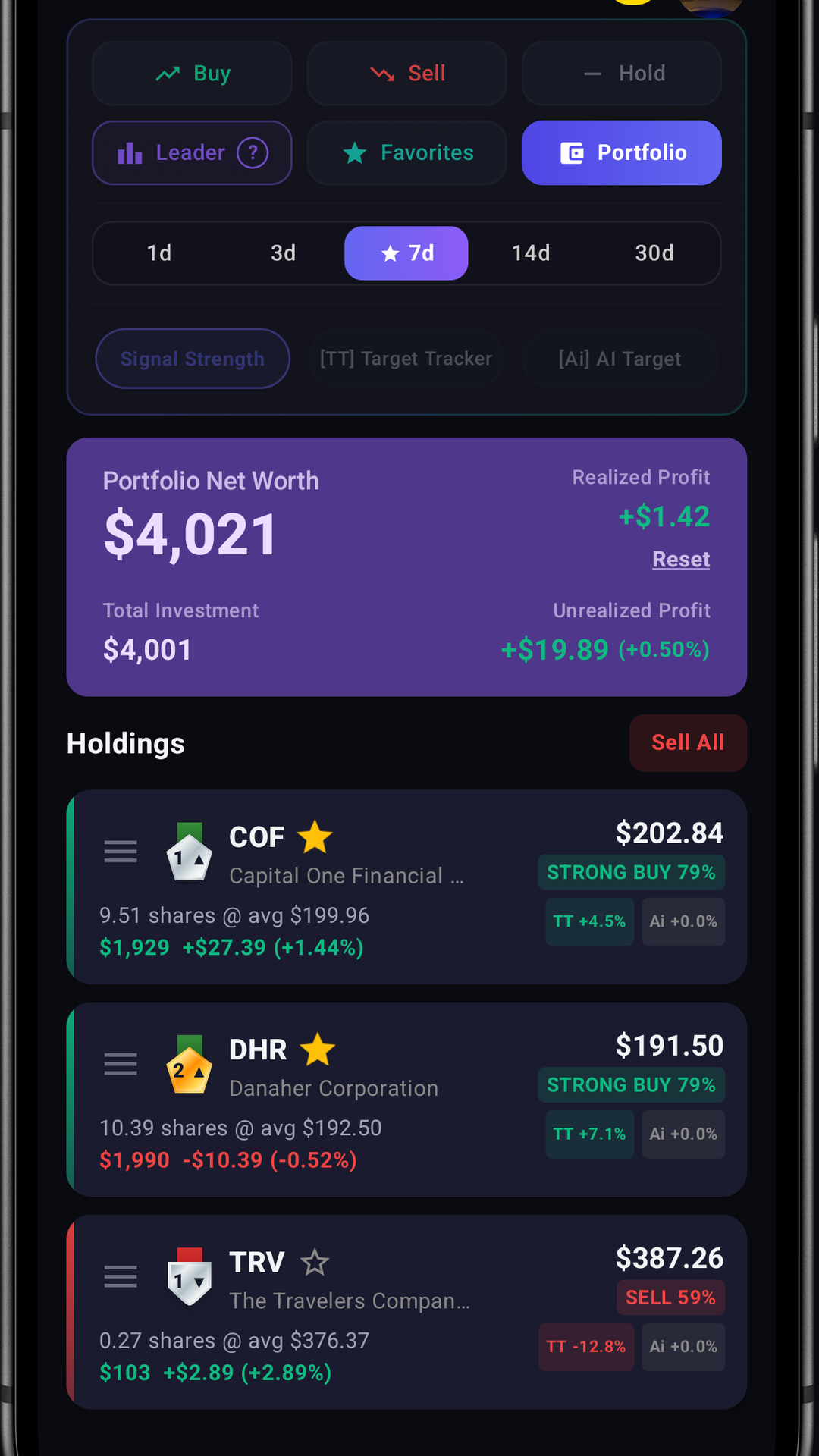
Portfolio Net Worth
Total combined value of your active stock positions calculated dynamically at live market prices.
Realized Profit
Total locked-in gains or losses from past closed (sold) transactions. Includes a quick Reset button.
Unrealized Profit (Floating P/L)
Live floating profit or loss across currently open positions based on average purchase price (cost basis).
Total Investment
Cumulative capital originally allocated to acquire all currently active positions in your portfolio.
⚡ 6.2 Step-by-Step Buying & Selling Stocks
Executing simulated paper trades in the app is seamless and intuitive:
Step 1: Open the Stock Detail Screen
Search or select any ticker from the Dashboard (e.g. AAPL) and tap it to open the Detail Screen.
Step 2: Tap the Floating "TRADE" Button
Tap the prominent TRADE action button at the bottom of the screen to open the Simulated Trade Dialog.
Step 3: Configure Transaction Parameters
Choose BUY or SELL. Enter the desired number of shares (e.g. 10 shares) or tap ALL to trade your entire holding. The dialog automatically calculates the total dollar value at the live market price.
Step 4: Confirm Execution
Tap Execute. Your holding is instantly updated, your cost basis is recalculated, and the trade is logged into your private transaction ledger!
📐 6.3 Realized vs. Unrealized Profit Explained
Understanding how the app tracks and calculates your investment performance:
📊 How Profit & Loss Is Computed
All portfolio metrics are computed natively and transparently on your device in real-time:
- Average Cost Basis: Computed by dividing your total invested capital by the total number of shares held, ensuring dollar-cost averaging is accurately reflected.
- Unrealized Profit (Open P/L): Reflects your live floating profit or loss across currently active positions by comparing the live market price against your average purchase cost.
- Realized Profit (Closed P/L): Locks in your net gains or losses when shares are sold, recording the exact difference between your exit price and your cost basis into your permanent ledger.
⚡ 6.4 Advanced Portfolio Actions
Sell All Holdings with 2-Step Confirmation
Want to cash out of your entire portfolio at market open? The Sell All button allows you to liquidate every active holding at current live prices in a single click. To prevent accidental liquidations, the app features a strict Two-Step Confirmation Dialog:
- First Dialog: "Are you sure you want to sell all holdings in your portfolio?" ➔ Tap "I Am Sure".
- Second Dialog: "Are you absolutely sure you want to proceed?" ➔ Tap "Execute".
Resetting Realized Profit
If you want to start a new trading challenge or reset your historical profit statistics to $0.00, tap the Reset button on the Realized Profit card. This resets past closed profit records without affecting your currently active open positions.
⚠️ 6.5 Top 5 Fatal Trader Mistakes
Even with advanced artificial intelligence, poor trade management can damage your returns. Avoid these 5 common psychological traps:
1. Greed at the P90 Ceiling
The Mistake: Refusing to lock in profits when a stock reaches its upper P90 boundary.
The Fix: P90 represents a 90% probability resistance ceiling. Take at least partial profits when price trades above P90.
2. Inaction at the P10 Floor
The Mistake: "Averaging down" or hoping a stock recovers after breaking through its P10 Stop-Loss Floor.
The Fix: P10 invalidates the bullish setup. Cut losses promptly to preserve your trading capital.
3. Over-Trading during Neutral Consolidation
The Mistake: Forcing trades on stocks in the Neutral tab with low confidence scores.
The Fix: Patiently wait for high-conviction BUY 80%+ setups during scheduled market scan times.
4. All-In Overconcentration
The Mistake: Putting 100% of your portfolio into a single volatile high-beta tech stock.
The Fix: Diversify across 5–10 stocks in different sectors (Tech, Healthcare, Financials, Energy).
5. Confusing Signal Decay with Breakdown
The Mistake: Selling in panic when a winning stock transitions from BUY to NEUTRAL.
The Fix: Understand that BUY ➔ NEUTRAL transition means the target has been reached, not that the stock crashed!